 server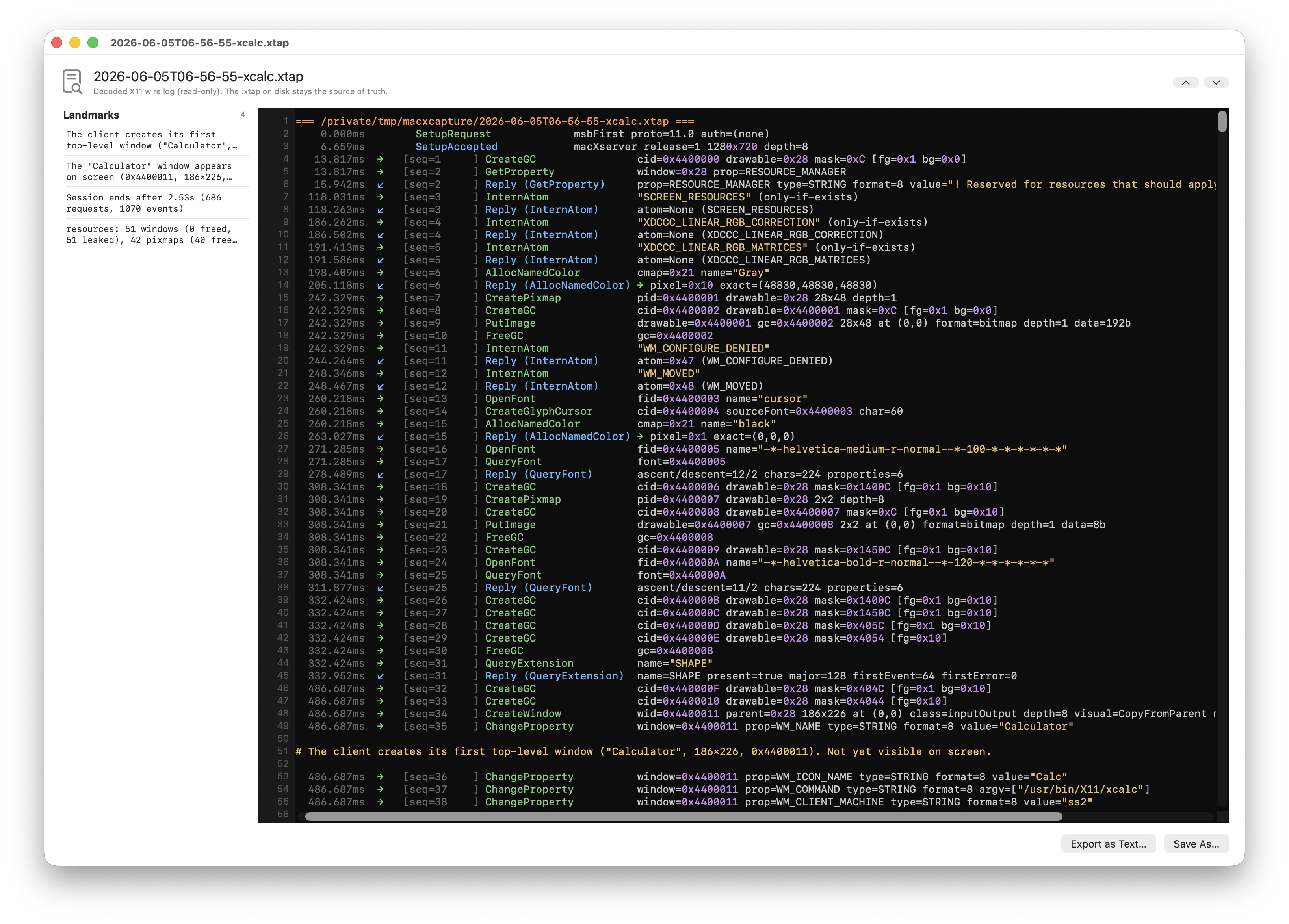
What it does
macXcapture is the companion app to macXserver. It records X11 sessions as
.xtap files: every byte the client sends to the server, every byte the server
sends back, fully time-stamped. The viewer decodes the protocol bytes into a
readable chrono dump — opcodes named, arguments typed, atom values
resolved, ICCCM properties parsed.
The recording can be replayed against any X server (a vintage Sun, XQuartz, macXserver) to compare behavior. Captures can be diffed against each other at the wire level. The server itself can record sessions automatically if you turn auto-capture on in Preferences.
Capture-first was the development methodology for the whole 30-day challenge. Before writing the server, I built the framer plus a proxy that records what real X clients send. Then for each new opcode, I’d:
- Find the capture where a client uses it.
- Read the X11R6 source for the matching server code.
- Write a Swift handler that produces the right bytes.
- Replay the capture and diff against the captured replies.
No protocol surprises. The corpus of captured sessions became the test suite. The same tools the project was built with are the tools you get to use against the project — nothing was internal-only.
For debugging a misbehaving X client, capture-and-replay is the right primitive. “Run it once, capture, replay until you understand what’s happening” beats “run it interactively and hope you can reproduce.”
What a decoded chrono dump looks like
Each frame in the .xtap is time-stamped and decoded into a single
human-readable line. A few lines from an xclock session:
   13.872µs [seq 0019] →  InternAtom   only-if-exists=0 name="WM_PROTOCOLS"
   14.041µs [seq 0019] ←  InternAtomReply  atom=312 (WM_PROTOCOLS)
   14.219µs [seq 0020] →  ChangeProperty  window=0x0040000a (xclock toplevel)
                                          property=312 (WM_PROTOCOLS)
                                          type=4 (ATOM) format=32 mode=Replace
                                          data=[314 (WM_DELETE_WINDOW)]
   14.387µs [seq 0021] →  MapWindow  window=0x0040000a (xclock toplevel)
Each request lists the named opcode, the resolved atom values, the typed
property contents, and the resource ID with a human-readable annotation drawn
from the session-wide resource registry. Replies are matched to their requests
by sequence number and shown with the ← glyph. Field-level diff between two
captures compares these by structure, not by text, so byte-for-byte equivalent
captures with different timestamps register as identical.
Technical detail
The .xtap format is documented in the macXcapture feature checklist . Key pieces:
- Time-stamped frames with C2S and S2C bytes, length-prefixed.
- A session-wide resource registry annotates the chrono dump with object lineage and leak detection.
- Type-aware decode for ICCCM
WM_*,_MOTIF_*,_NET_*, RANDR, XKB, XInput v1, RENDER, MIT-SHM, BIG-REQUESTS, XC-MISC, XTEST, RECORD, SHAPE. - Narrative landmark detection: clients that emit
XLog-style markers get them surfaced as left-justified#callouts in the viewer with sidebar navigation (Cmd-] / Cmd-[). - Field-level semantic diff between two captures, with longest-common-subsequence alignment.
The capture app and the server share a SwiftXCaptureUI library so the viewer
in the capture app and the debug viewer in the server are pixel-identical.
Related
- Capture v1 (CLI tool) shipped Days 1–2 . v2 (library plus GUI app plus server-side auto-capture) landed across Days 19–20 .
- The decoder coverage push (framer Phase 1 plus the extension dumpers) was Days 25–27 .
- Landmark detection shipped Day 26 .